URBO
SMART CITY OPERATIONS PLATFORM
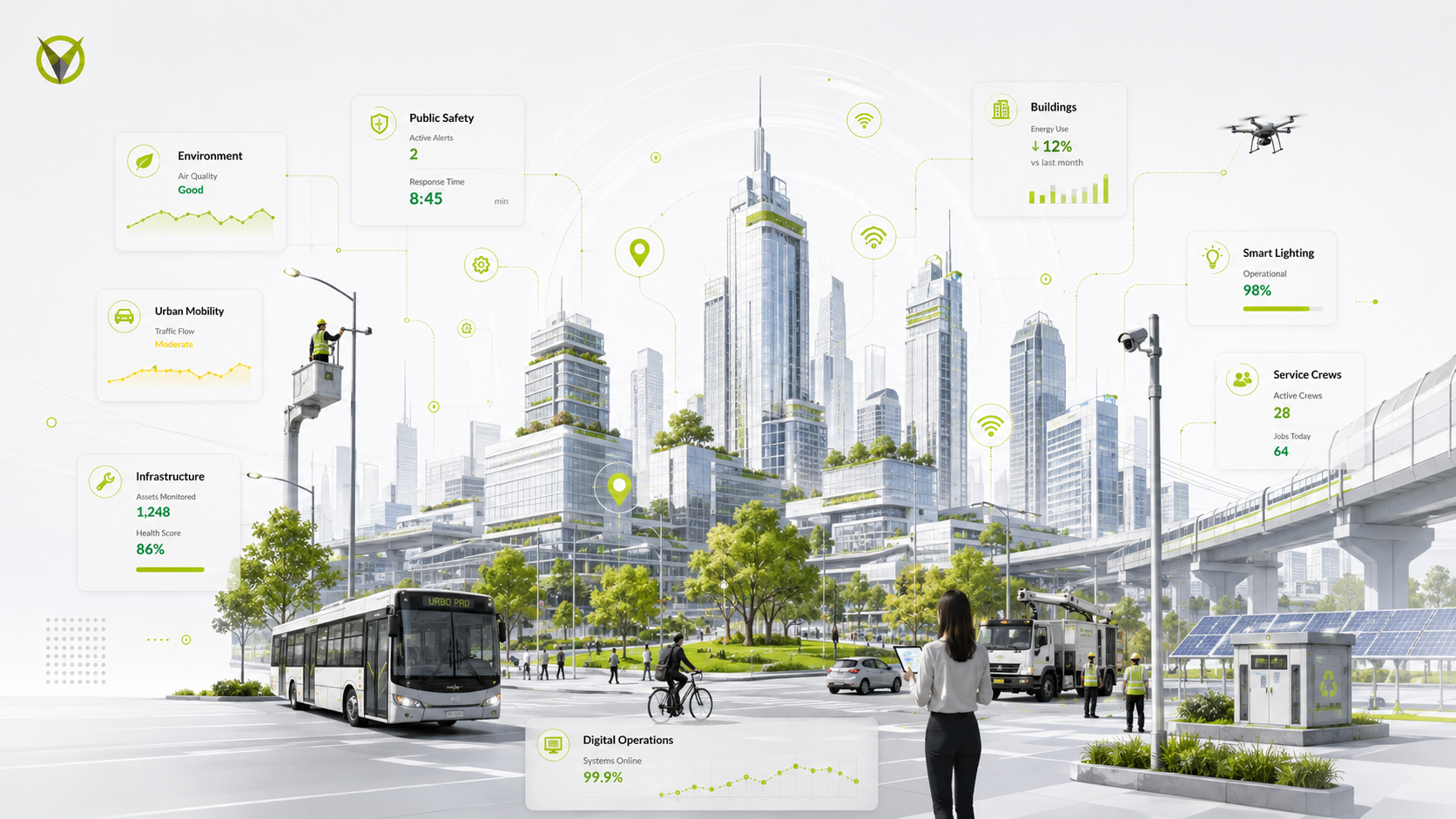
URBO is VIKUA’s smart-city operations platform, designed to help governments and operational teams monitor infrastructure, coordinate mobility, manage maintenance, connect IoT devices, and act on city data through one connected ecosystem.
ROLE:
Junior Product Designer (UX/UI)
Junior Product Designer (UX/UI)
COMPANY:
VIKUA
TIMELINE:
2018 - 2020
PRODUCT AREAS:
Enterprise SaaS · Smart Cities · Urban Mobility · Fleet Management · IoT · Asset Management
DESIGN SCOPE:
Product Design · UX/UI · User Flows · Interaction Design · Prototyping · Design Systems
Product Design · UX/UI · User Flows · Interaction Design · Prototyping · Design Systems
RESPONSIBILITIES:
Requirements Translation · Workflow Design · Interface Design · Cross-Module Consistency · Product Documentation
TOOLS:
Figma · Adobe XD · Illustrator · Photoshop
The Challenge
URBO brought together interconnected layers of city operations, including public transportation, infrastructure, maintenance, IoT devices, organizations, users, and operational data within a single digital ecosystem.
The design challenge was to make that complexity manageable. The platform needed to support very different roles and workflows while making large amounts of information easier to navigate, monitor, and act on without losing consistency across an expanding product.
My Contribution
As a Junior Product Designer, I designed and refined workflows across transportation management, fleet maintenance, incident reporting, IoT device onboarding, dashboards, and organization administration.
I worked alongside product, engineering, and domain stakeholders to translate operational requirements into workflows, interfaces, and reusable interaction patterns.
Structuring the Product
Turning a growing ecosystem into a scalable product structure
URBO was not a single-purpose application. It brought together city management, transportation networks, infrastructure, connected devices, maintenance, organizations, and operational tools within one platform.
As the product expanded, the challenge became defining an information architecture that could keep these capabilities connected without making the experience feel fragmented. The structure needed to support movement between high-level city information and highly specific operational tasks—from monitoring a transportation unit to reporting an incident or scheduling maintenance.
Rather than designing each capability as an isolated feature, the platform needed shared structures, navigation patterns, and connections between modules that could continue to scale as new services were introduced.
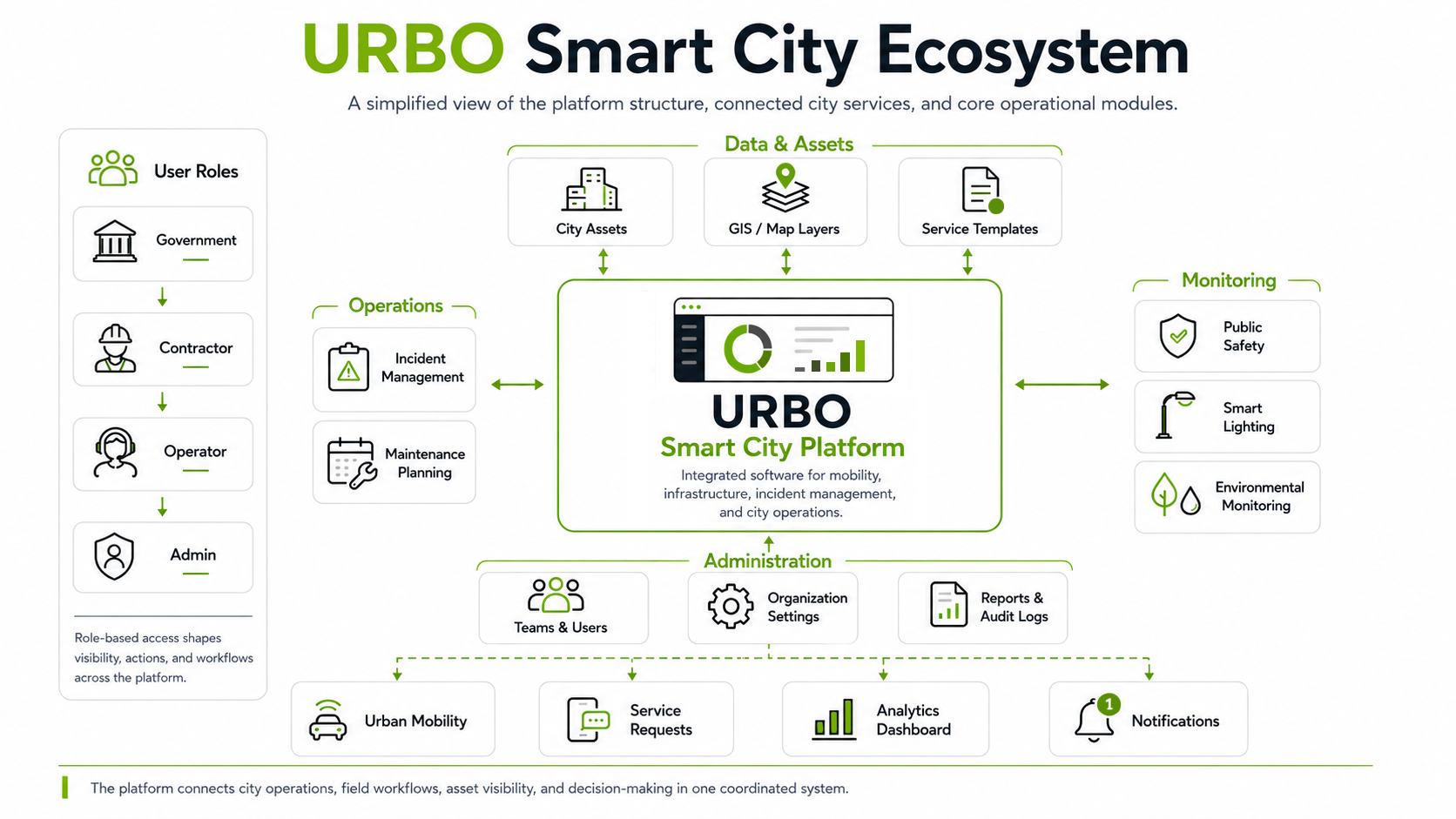
A high-level view of URBO’s product architecture, showing how city assets, operational tools, connected infrastructure, administration, and user access come together through a shared platform.
Core Product Flows
Connecting information to action
Once the product structure was established, the next challenge was making sure URBO’s different modules worked as connected operational journeys rather than isolated tools.
Workflows were designed to carry information forward as users moved from setup and monitoring into planning, intervention, and follow-up. A registered asset could become part of an operational view; transportation demand could inform service planning; an incident could progress into a scheduled repair; and data from a connected device could surface through monitoring and reporting.
This created continuity across the platform, allowing actions in one part of URBO to remain connected to the assets, data, and operational context that informed them.
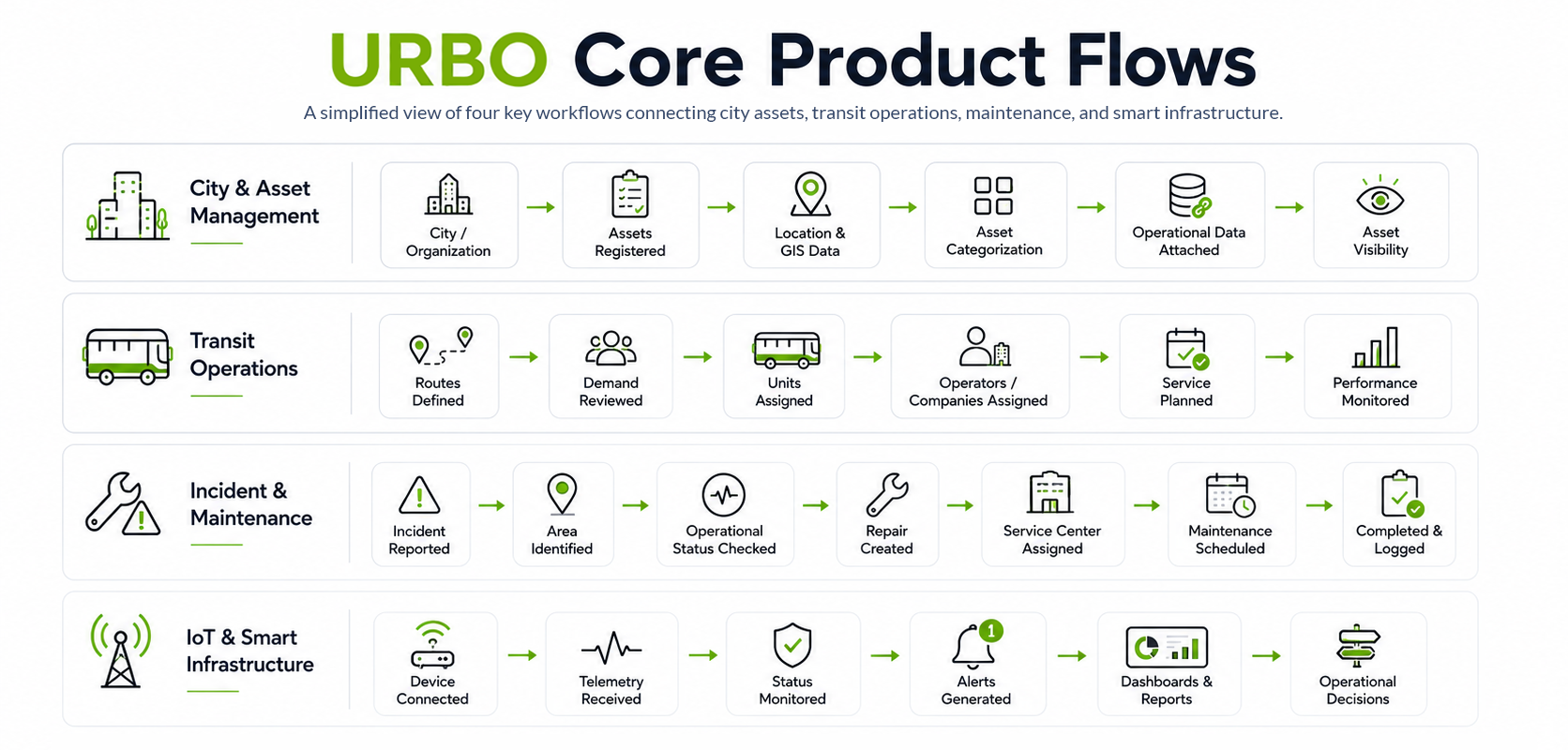
Four representative workflows illustrate how information moves through URBO—from registering assets and planning services to responding to incidents and turning connected-device data into operational decisions.
Designing Around Different City Roles
Mapping a city’s operational ecosystem
URBO was designed for a network of organizations and stakeholders rather than a single type of user. The research mapped 19 roles across government, contractors, operating companies, field teams, and citizens, each interacting with city services from a different level of responsibility.
Looking beyond job titles, we documented their needs, pain points, motivations, limitations, and relationships to one another. The research also mapped how information moved from citizens and operational teams through supervisors, analysts, managers, planners, directors, and government decision-makers.
These relationships helped define more than permissions. They influenced what information each role needed to see, what actions they could perform, how workflows were handed between teams, and how the same underlying city data needed to support both day-to-day operations and higher-level decision-making.
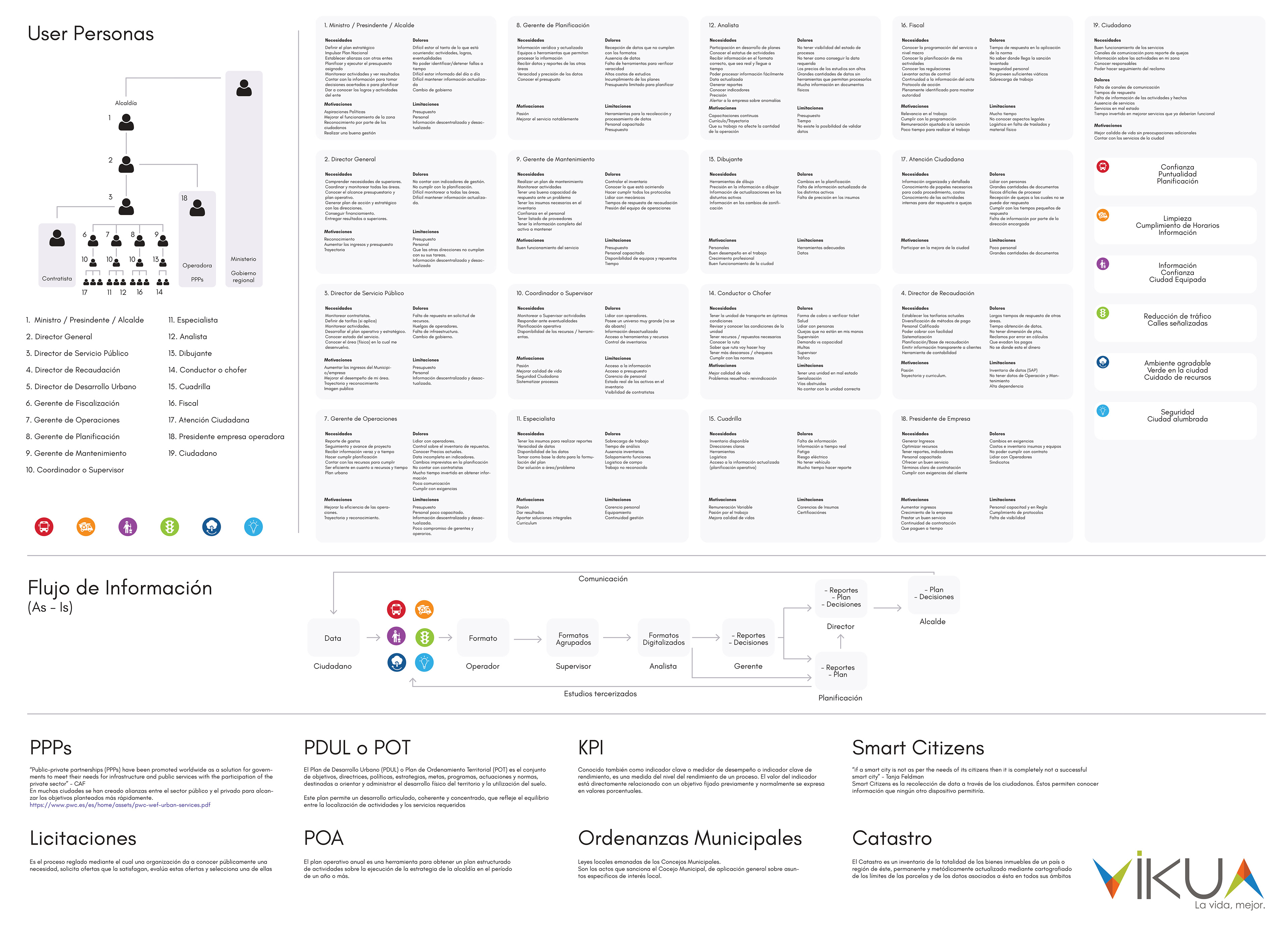
Original stakeholder research artifact (Spanish), mapping 19 roles alongside their needs, pain points, motivations, limitations, and existing information flows —revealing how responsibilities and decisions moved across government, operators, field teams, and citizens.
From Research to Product Decisions
Turning stakeholder insights into product architecture
The research revealed that URBO was not serving a single user journey. The platform had to support a network of government teams, operators, contractors, specialists, field workers, and citizens—each with different responsibilities, information needs, and levels of decision-making authority. The original stakeholder work mapped 19 distinct roles alongside their needs, pain points, motivations, and limitations.
Across those roles, recurring problems appeared: fragmented or outdated information, limited visibility into operations, difficulty coordinating across teams, and different needs for access and control. Senior roles needed reliable information for planning and oversight, while operational roles needed current asset information, clear responsibilities, and faster ways to respond to problems.
Rather than treating those findings as research documentation that ended with the study, they became inputs into how the product was structured.
Organizations → Users → Groups → Permissions → Operational Modules
Organizations → Users → Groups → Permissions → Operational Modules
This layered model allowed URBO to maintain a shared product foundation while adapting what information, tools, and actions were available according to each user's responsibilities. It also reflected the reality that city operations could span multiple organizations: URBO's requirements describe administrators creating organizations and selecting the services they manage, while operators and contractors could manage assets or devices that were shared across municipalities and government teams.
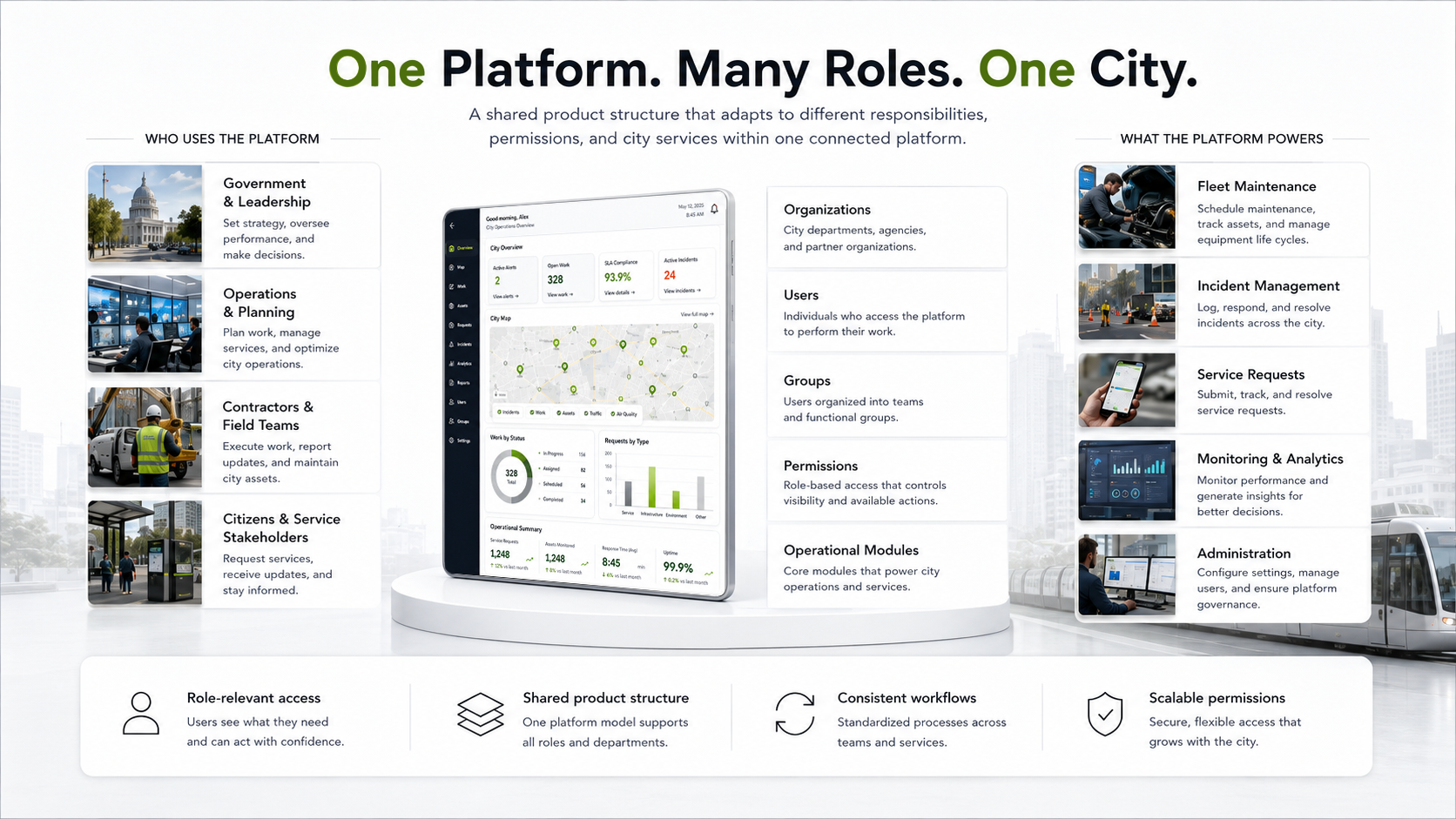
Stakeholder research translated into a layered product model, connecting organizations, users, groups, permissions, and operational modules within one consistent platform experience.
Designing a Modular Platform
Building consistency across different operational contexts
URBO contained modules with very different purposes—from monitoring city operations and transportation networks to managing maintenance, incidents, assets, and administrative tasks.
Designing each area independently would have made the platform increasingly difficult to learn and maintain. Instead, we relied on shared interaction patterns, navigation structures, components, status conventions, and information hierarchies that could be reused across the product.
The challenge was to create enough consistency that users could transfer what they learned from one part of URBO to another, while still giving each module the flexibility required by its specific workflow.
This modular approach helped the interface evolve as new capabilities were introduced without requiring every experience to be redesigned from the ground up.
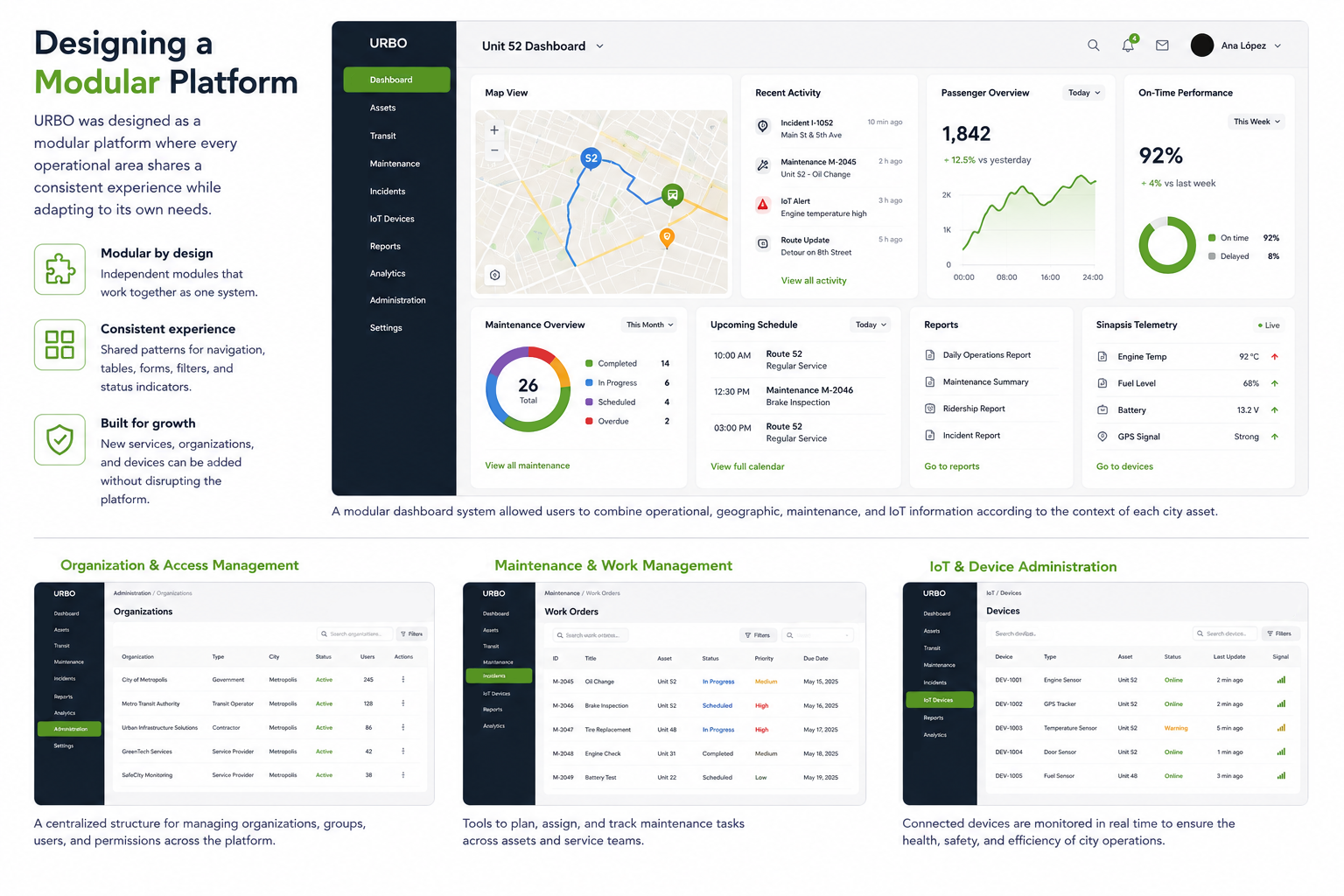
Different operational modules reused common navigation, components, status patterns, and information structures, creating familiarity across workflows while allowing each area to serve its own purpose.
Fleet Maintenance & Incident Management
Maintenance teams needed more than a record of damaged assets. The stakeholder research showed needs around planning maintenance, monitoring activities, responding quickly to problems, accessing complete asset information, managing inventory and providers, and maintaining visibility into what was happening across the fleet.
That led to an important design decision: an incident should not exist as an isolated report. It should become the starting point of a connected operational workflow.
In URBO, a reported issue could carry its context forward—from describing the incident and identifying its physical location on the vehicle to determining whether the unit could remain operational, creating the repair, assigning responsibility, scheduling the work, and preserving the result in the asset’s maintenance history.
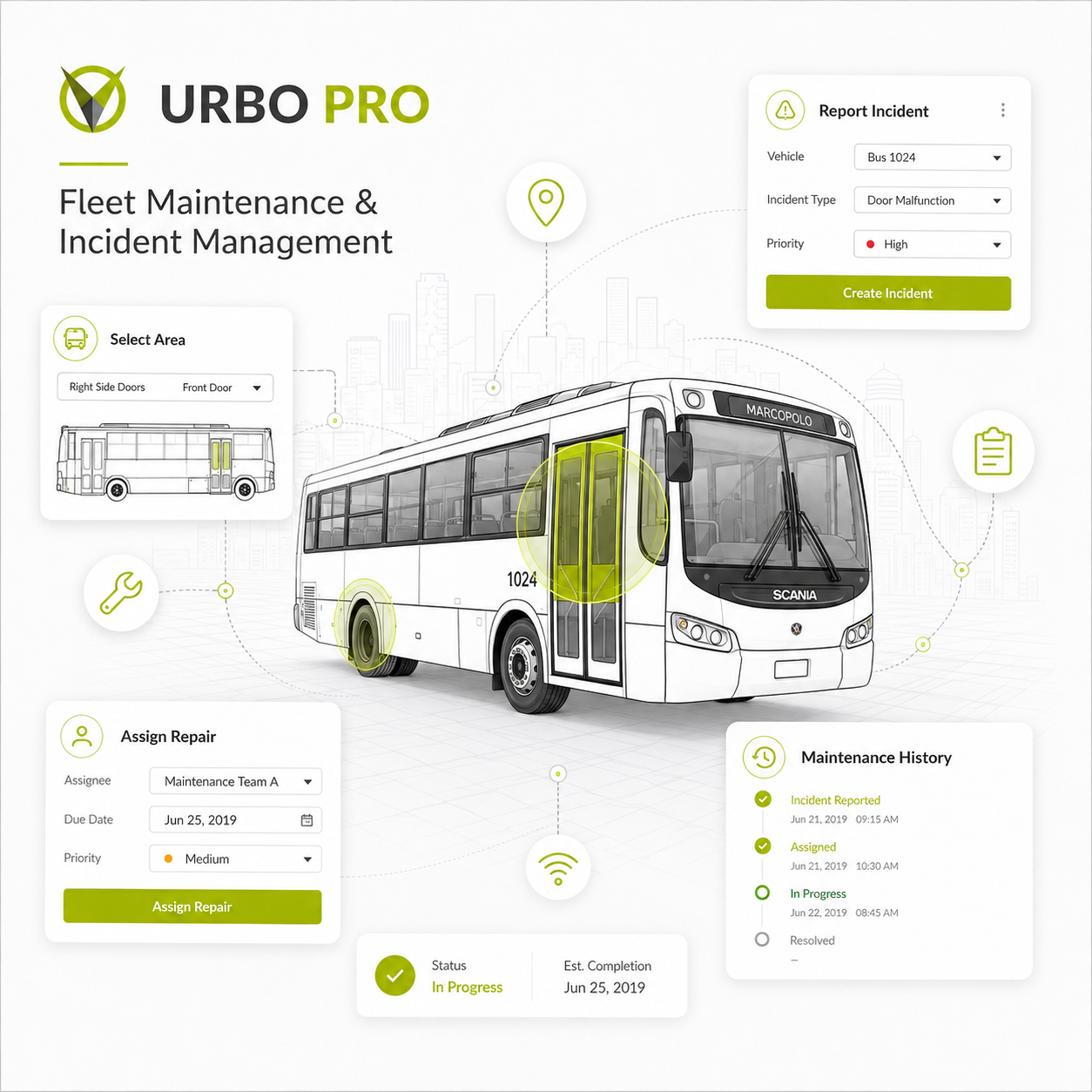
From Incident to Resolution
The workflow was designed to preserve context as responsibility moved between people and stages. Instead of repeatedly re-entering information, users could begin with the reported incident, identify the affected area directly on the vehicle model, review its operational status, and continue into repair planning.
The interface used progressive steps to reduce the amount of information presented at once while maintaining a clear relationship between the incident, asset, repair, service center, schedule, and historical record.
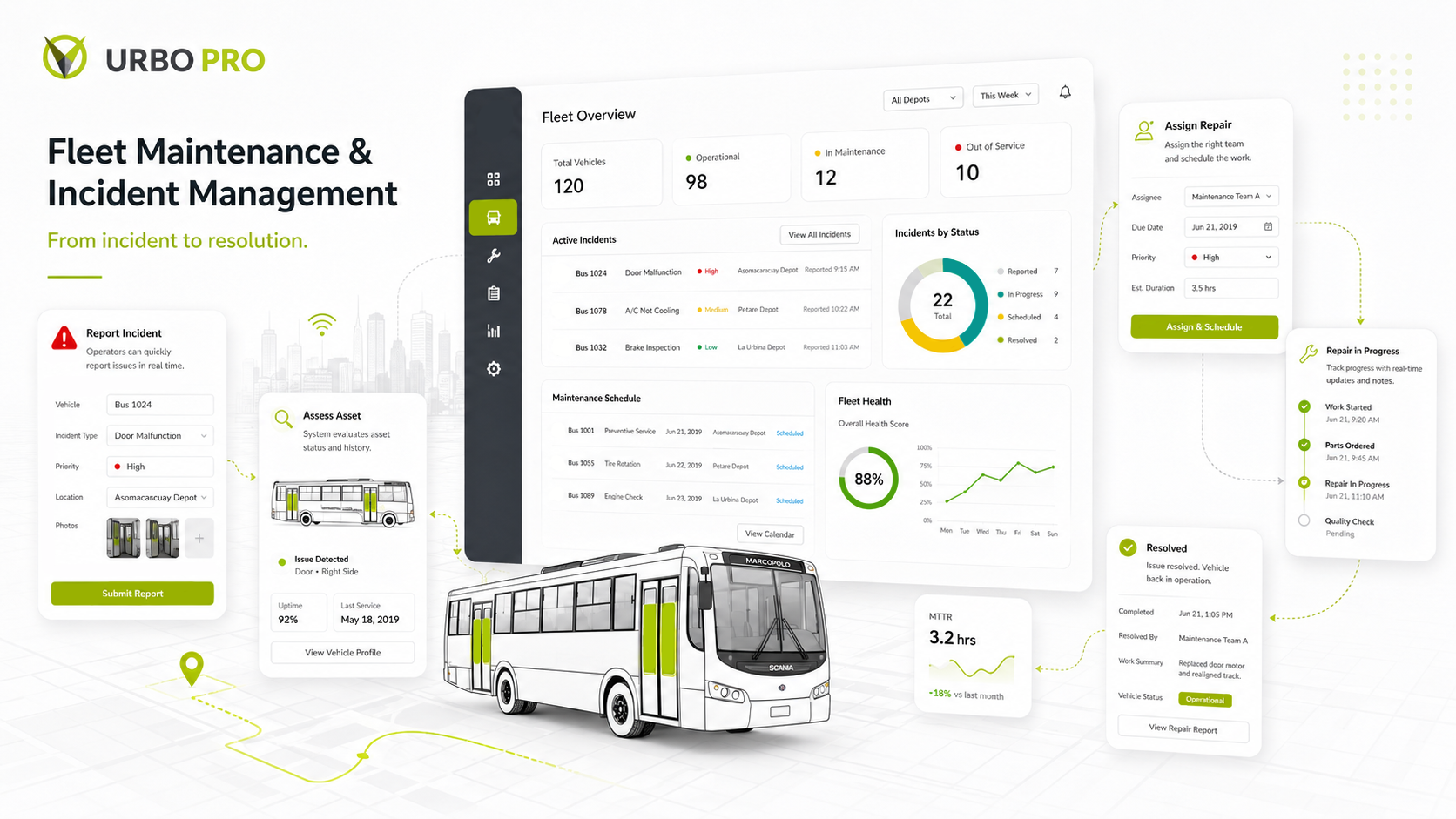
A connected maintenance workflow carries incident context from the affected vehicle area through repair assignment, progress tracking, and maintenance history.
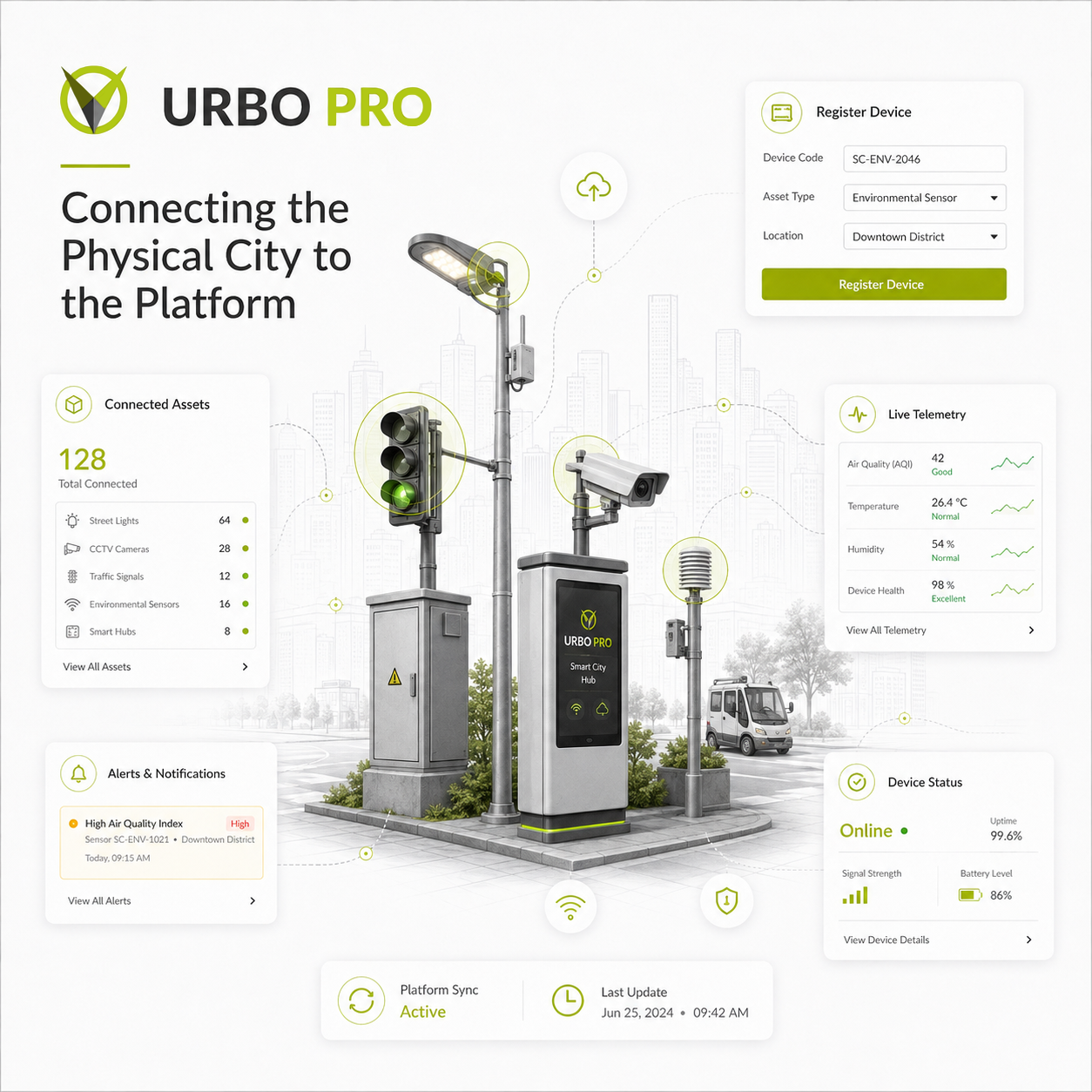
The device was not the asset. It was the bridge between a physical asset and its digital information.
Connecting the Physical City to the Platform
Linking real-world infrastructure to digital
URBO depended on information collected from the physical city. Sinapsis devices could provide real-time data from transportation infrastructure—including vehicle location, passenger counts, door sensors, cameras, and emergency controls—and make that information available through the URBO platform.
But connecting hardware to the platform involved more than registering a device. The workflow needed to establish which device was connected, whether the connection was valid, which city it belonged to, and which physical asset it represented. For third-party devices, the requirements explicitly structured this around configuring the provider, adding the device, validating the connection, and then linking it to an urban asset within a specific city.
That relationship became essential to the integrity of the data. A device could later be moved from one physical asset to another, but the information collected during each period still needed to remain associated with the correct asset rather than being
merged together.
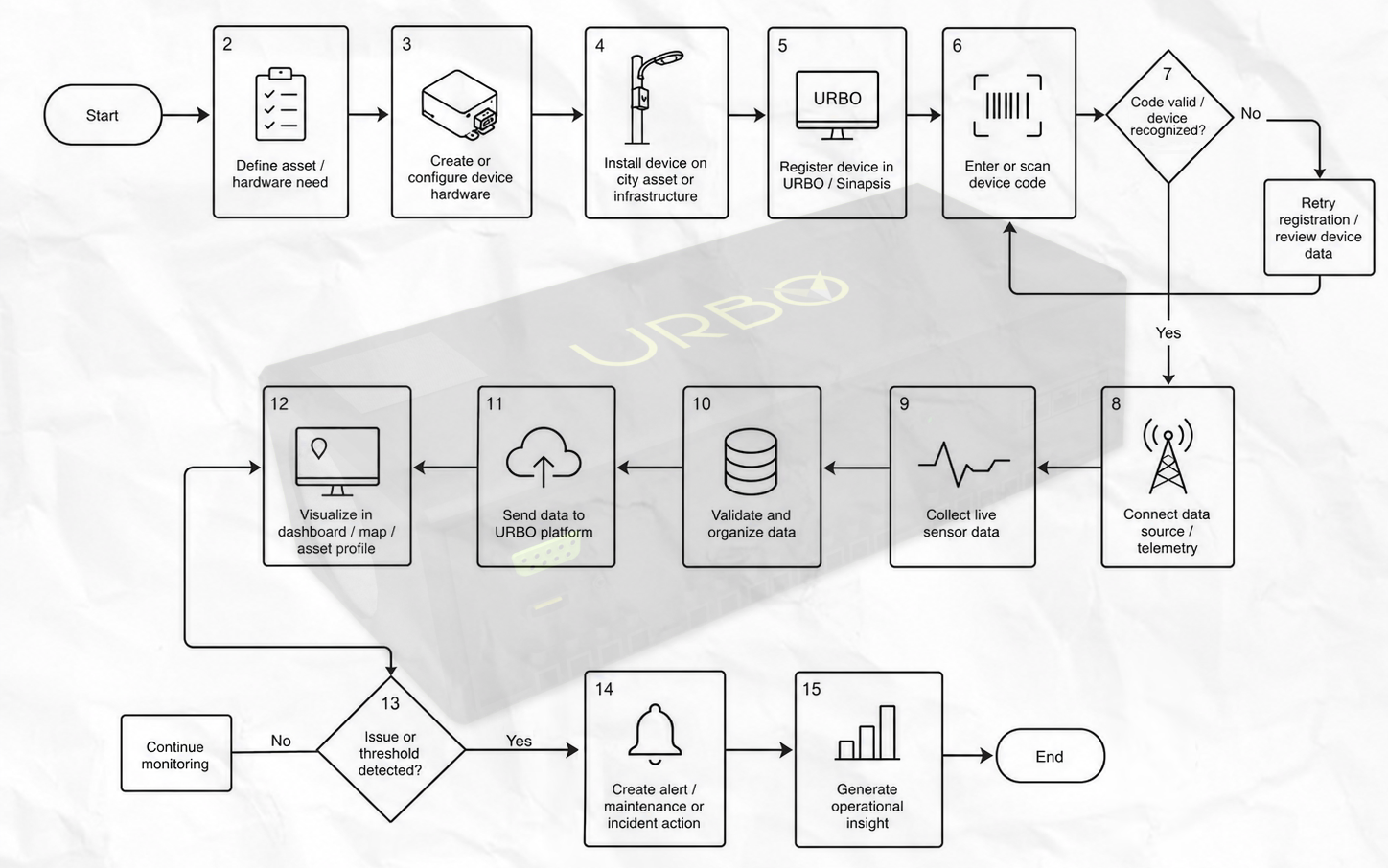
A simplified end-to-end flow showing how physical devices were defined, installed, registered in URBO, connected to telemetry, and transformed into actionable operational insight.
From physical assets to actionable information
Once a device was successfully connected to an urban asset, its data gained context. Location, telemetry, sensor readings, and operational signals were no longer isolated device outputs—they could be understood in relation to the asset, service, city, and operational workflow they belonged to.
That allowed URBO to surface connected information through maps, monitoring interfaces, dashboards, and operational workflows, giving teams a clearer path from what was happening in the physical city to what required attention inside the platform.
The goal was therefore not simply to collect more data, but to make that data meaningful enough to support monitoring, maintenance, planning, and operational decisions.
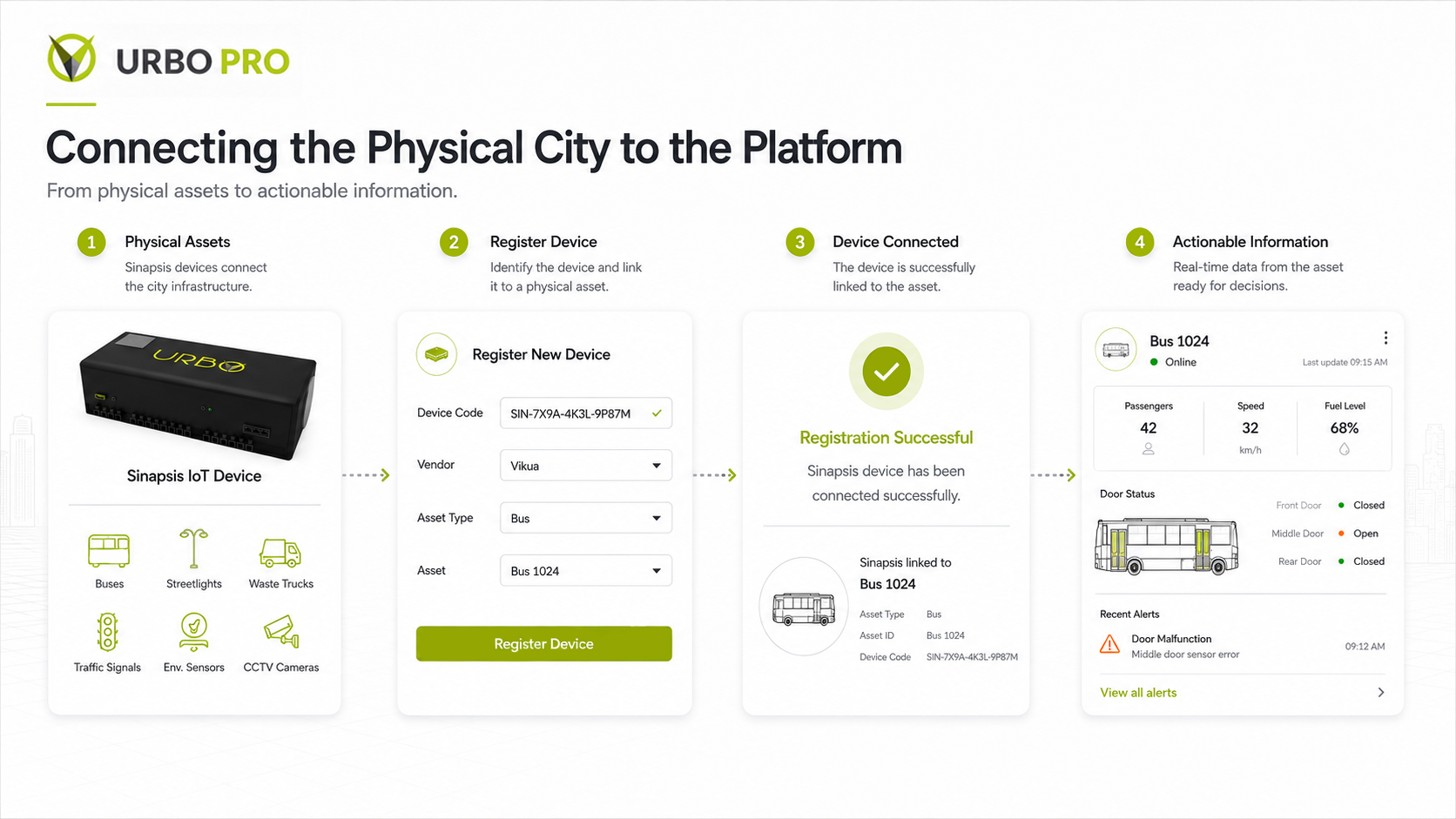
The onboarding flow translated a technical integration process into a guided experience: identify the device, verify its connection, and establish its relationship to the correct city asset.
Planning City Operations
Turning operational data into service decisions
Planning a transportation service required more than placing vehicles on a schedule. Planners needed to understand how demand, available capacity, assigned units, route duration, speed, and service frequency affected one another before deciding how a route should operate.
URBO brought those variables into the same workflow so planners could move from understanding the conditions of a route to defining how the service should respond.
For example, the planning interface could present the system demand and supply, number of units assigned, estimated travel time, and minimum or maximum service intervals while allowing the user to adjust demand assumptions and calculate frequency.
The interface was designed around the decision being made, not around a collection of disconnected transportation metrics.
Demand alone could not determine how a route should operate. Planners also needed to consider the number of available units, passenger capacity, travel time, and acceptable intervals between vehicles.
By placing these variables together, URBO made their relationships easier to evaluate before translating them into a timetable or operational schedule. The resulting plan could then be viewed across time and assigned to the vehicles responsible for delivering the service.
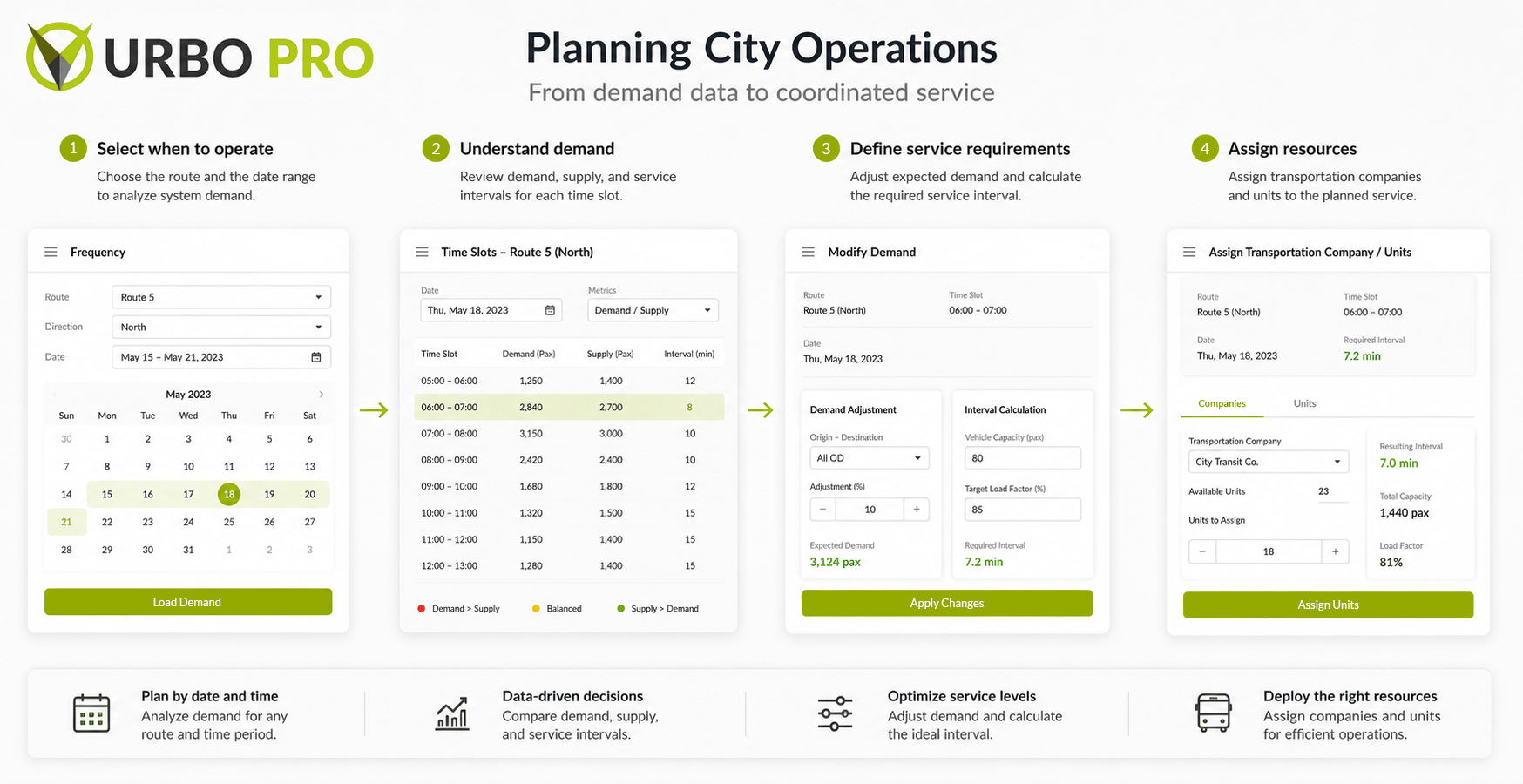
Transportation planning brought demand, available capacity, route conditions, assigned units, and service frequency into one workflow, helping planners translate operational data into a workable service plan.
Monitoring & Operational Intelligence
URBO brought operational information from across the city into centralized dashboards designed to support monitoring, evaluation, and decision-making.
Rather than forcing users to navigate separate modules to understand what was happening, the platform brought key activity, alerts, asset status, maintenance information, passenger data, location, and performance indicators into a shared operational view.
The challenge was not simply displaying more data. It was creating enough hierarchy for users to quickly distinguish between what was happening, what required attention, and what action could be taken next.
From planning to operational oversight
Dashboards were structured around the context of the asset or service being monitored. A transit unit, for example, could bring together its assigned routes, recent activity, incident reports, maintenance status, current location, passenger counts, performance indicators, and connected-device information.
By placing related signals in one context, users could move from a high-level operational overview into the specific asset, event, or workflow that required further investigation.
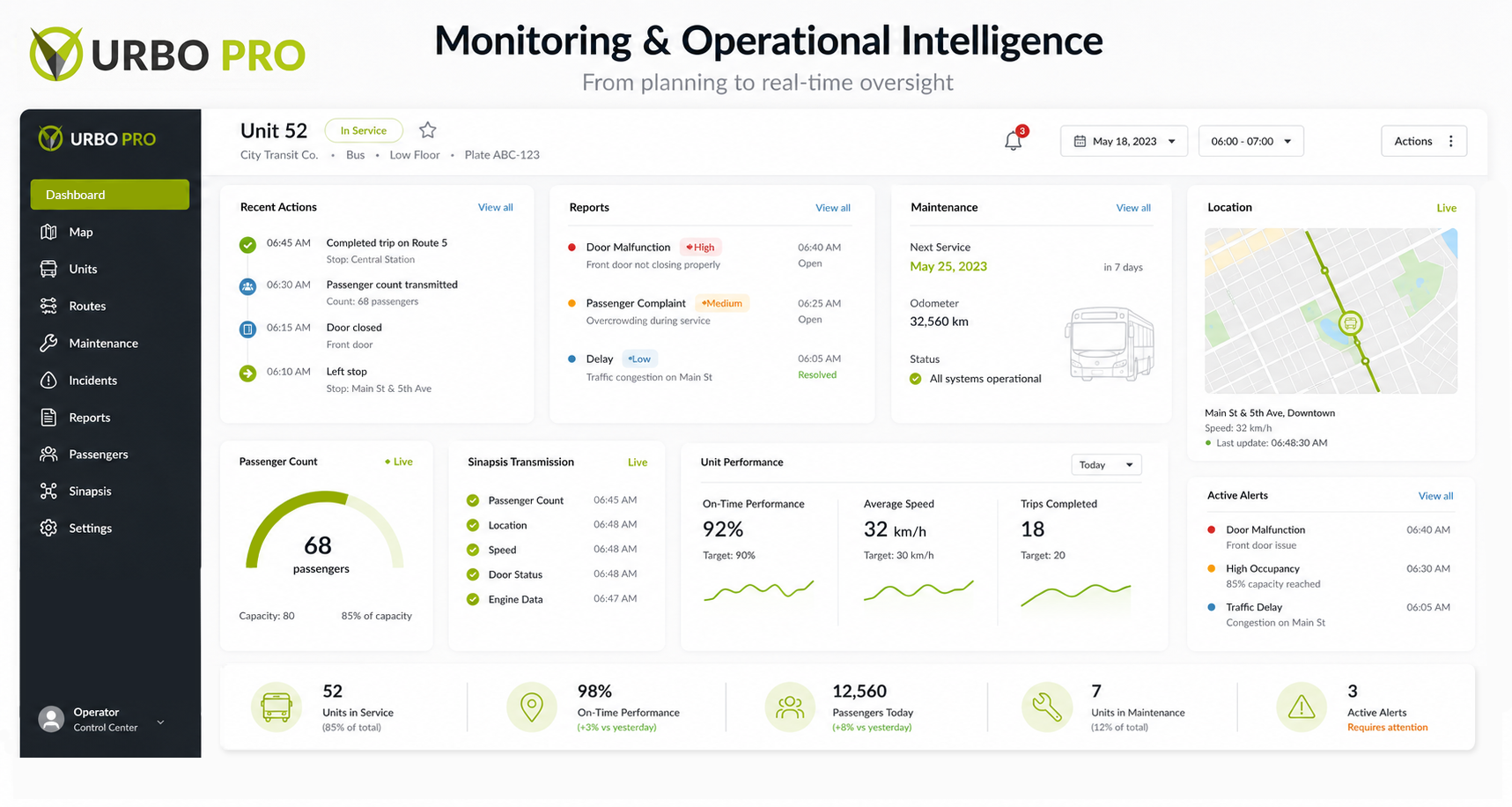
A unit-level operations dashboard brings routes, recent activity, location, maintenance, passenger data, device status, and alerts into one monitoring context.
Managing a Complex Organization
Governance, users, permissions, and access
Once the organizational model was established, URBO needed a way to manage it day to day. I worked on experiences for organization administration, users, groups, permissions, and role-based access—turning the underlying governance model into something administrators could actually configure and maintain.
Instead of assigning access independently to every person, users could be organized around roles and groups, allowing permissions to be managed more systematically as teams and responsibilities evolved.
This gave administrators control over who could access specific areas and actions while keeping operational users focused on the tools and information relevant to their work.
Designing access around responsibility
Permissions were treated as part of the product architecture rather than simply a settings feature. Access needed to reflect what a person was responsible for—not just whether they had an account.
Users could be organized into groups, inherit access through defined roles, and receive permissions for specific areas or actions within the platform. This allowed the same URBO environment to adapt to administrators, managers, operators, and other specialized roles without requiring a separate product experience for each one.
Access control became a way to reduce complexity: each user could focus on the parts of URBO relevant to their responsibilities.
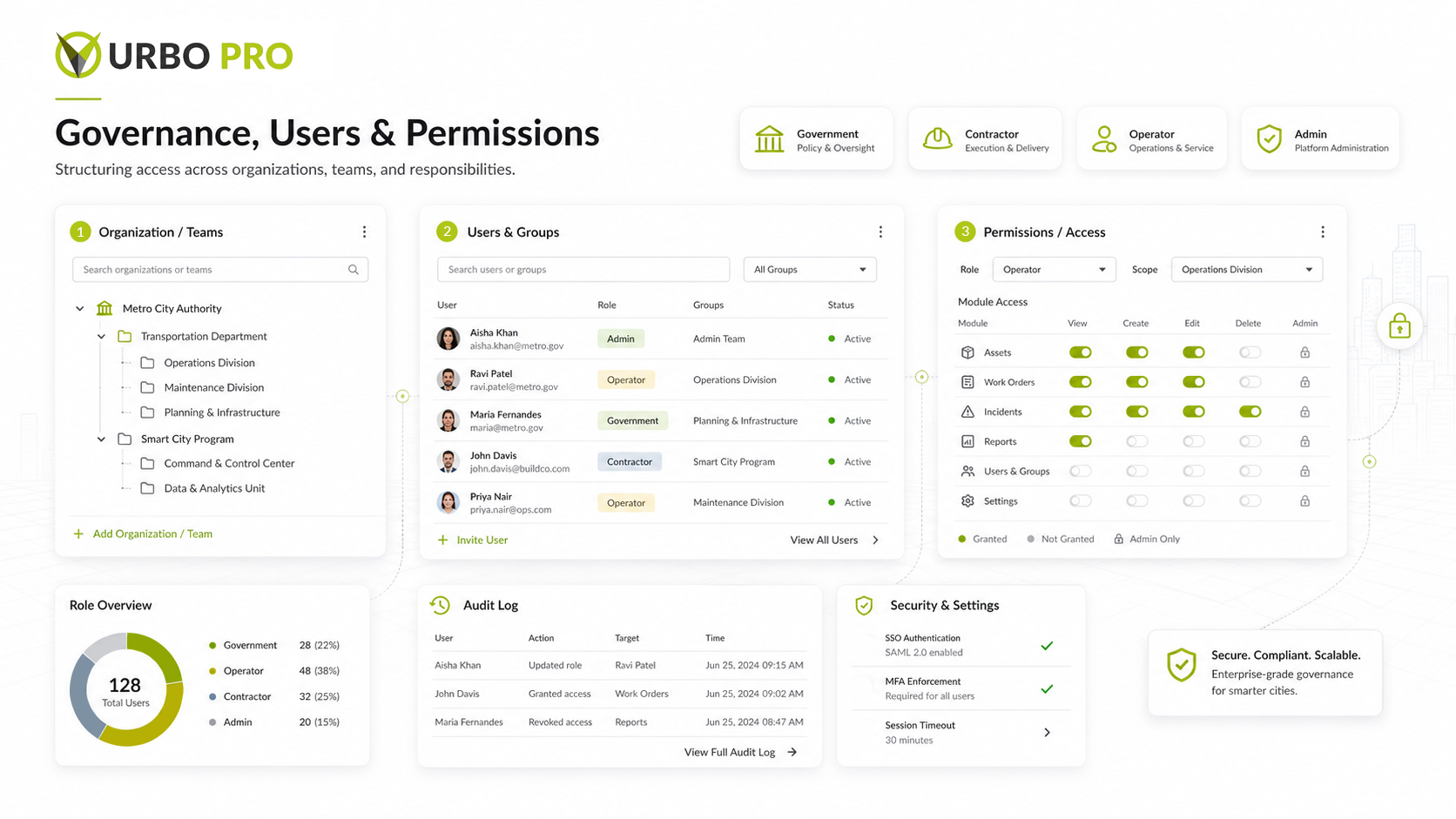
The administration model connects organizational structure, user groups, roles, and granular permissions so access can scale without exposing every capability to every user.
Bringing the System Together
How the pieces worked as one system
URBO’s individual modules solved very different problems, but their value came from how they worked together. Assets registered in the platform could become part of monitoring and maintenance workflows. Connected devices could provide operational data. Planning decisions could move into schedules and oversight. Permissions determined who could access and act on that information.
The design challenge was therefore not only creating usable individual screens, but maintaining continuity across the system—shared interaction patterns, consistent information structures, and workflows that preserved context as users moved between modules.
Together, these decisions helped URBO behave less like a collection of tools and more like a connected operational platform where information could move from physical infrastructure → digital context → monitoring → action → follow-up.
Product & Design Outcomes
A more coherent operational product
Across the areas I contributed to, the work helped establish a more connected URBO experience. Shared navigation, reusable components, status patterns, role-based permissions, and structured workflows created continuity across transportation, maintenance, connected devices, administration, and monitoring.
Rather than treating each capability as an isolated interface, the product could preserve context as users moved between assets, operational information, planning, incidents, maintenance, and follow-up.
The result was a more coherent product experience capable of supporting both high-level city oversight and detailed operational work within the same system.
A system designed to grow
URBO was conceived as an ecosystem rather than a single-purpose application, so the interface needed to accommodate new services, organizations, assets, devices, and workflows without losing consistency.
Reusable interaction patterns, shared components, and a modular product structure gave new capabilities a foundation to build on instead of requiring every experience to start from zero.
The outcome was not just a collection of finished screens, but a product foundation designed to evolve as the platform expanded.
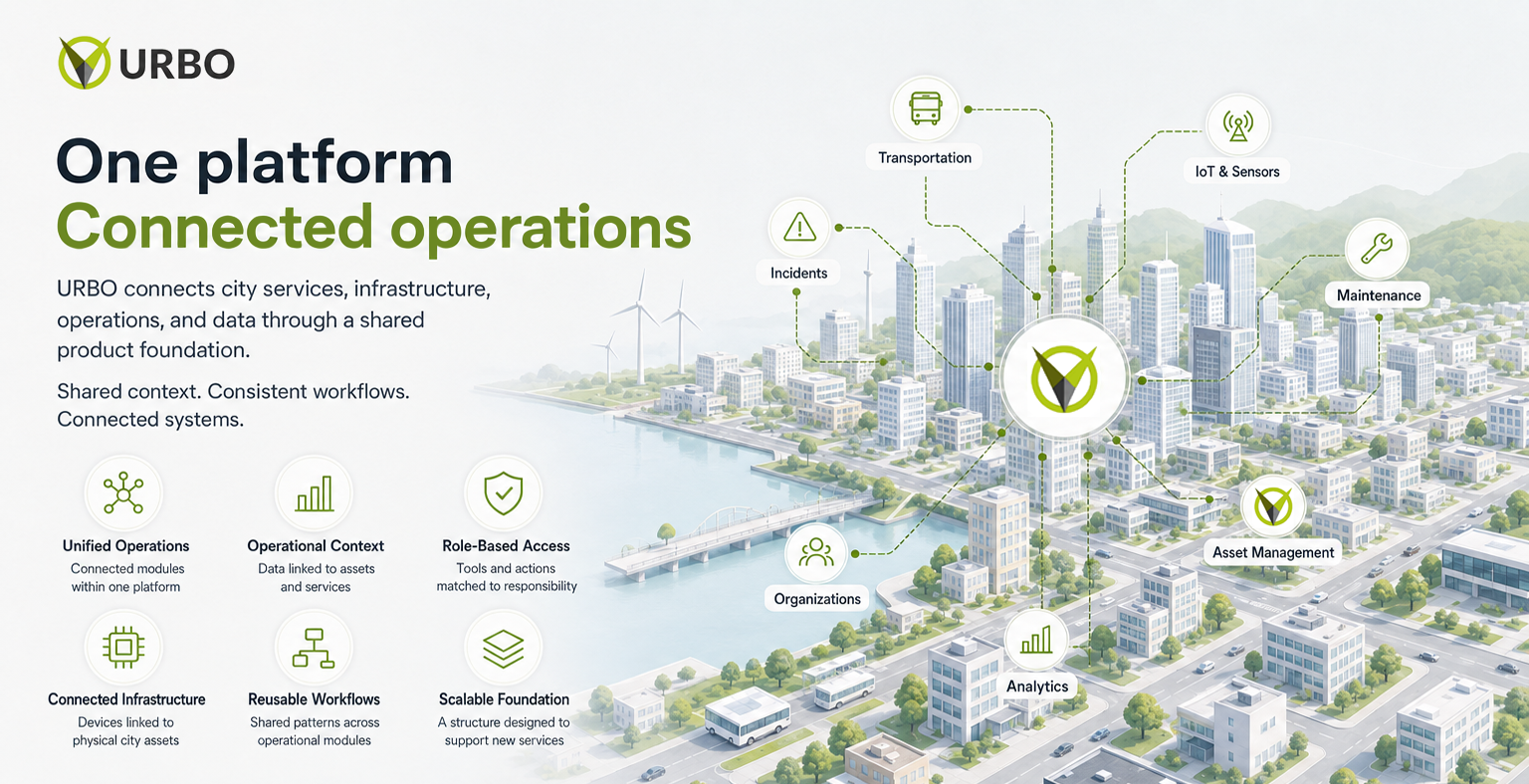
The resulting product foundation connects operational modules through shared structures, workflows, access patterns, and data relationships while remaining flexible enough to support new city services.
Designing URBO
What working on a city-scale platform taught me
Working on URBO challenged me to think beyond individual screens and features. Decisions about users, assets, permissions, navigation, data, and workflows were interconnected, and a change in one area could influence several others across the platform.
It also changed how I think about complexity. A large system does not become usable simply by hiding information. The real challenge is deciding what needs to remain visible, how it should be structured, and which level of detail each person needs to make a decision.
Most importantly, I learned that understanding users only becomes valuable when that understanding influences the product. Research into roles, responsibilities, pain points, and information flows mattered because those insights could be translated into architecture, permissions, workflows, and interface decisions.
Designing for the system, not just the screen
One of my biggest takeaways from URBO was learning to evaluate an interface as part of a larger operational journey.
Instead of asking only:
“Does this screen work?”
I learned to ask:
“ Where does this information come from, who needs it next, what decision should it support, and what should happen after? ”
That mindset became especially important across incidents, maintenance, connected devices, city assets, permissions, planning, and operational dashboards. Each interface represented one moment inside a larger system of people, information, and actions.
URBO helped shape the way I approach product design today: understand the system first, then design the experience that makes that system understandable.
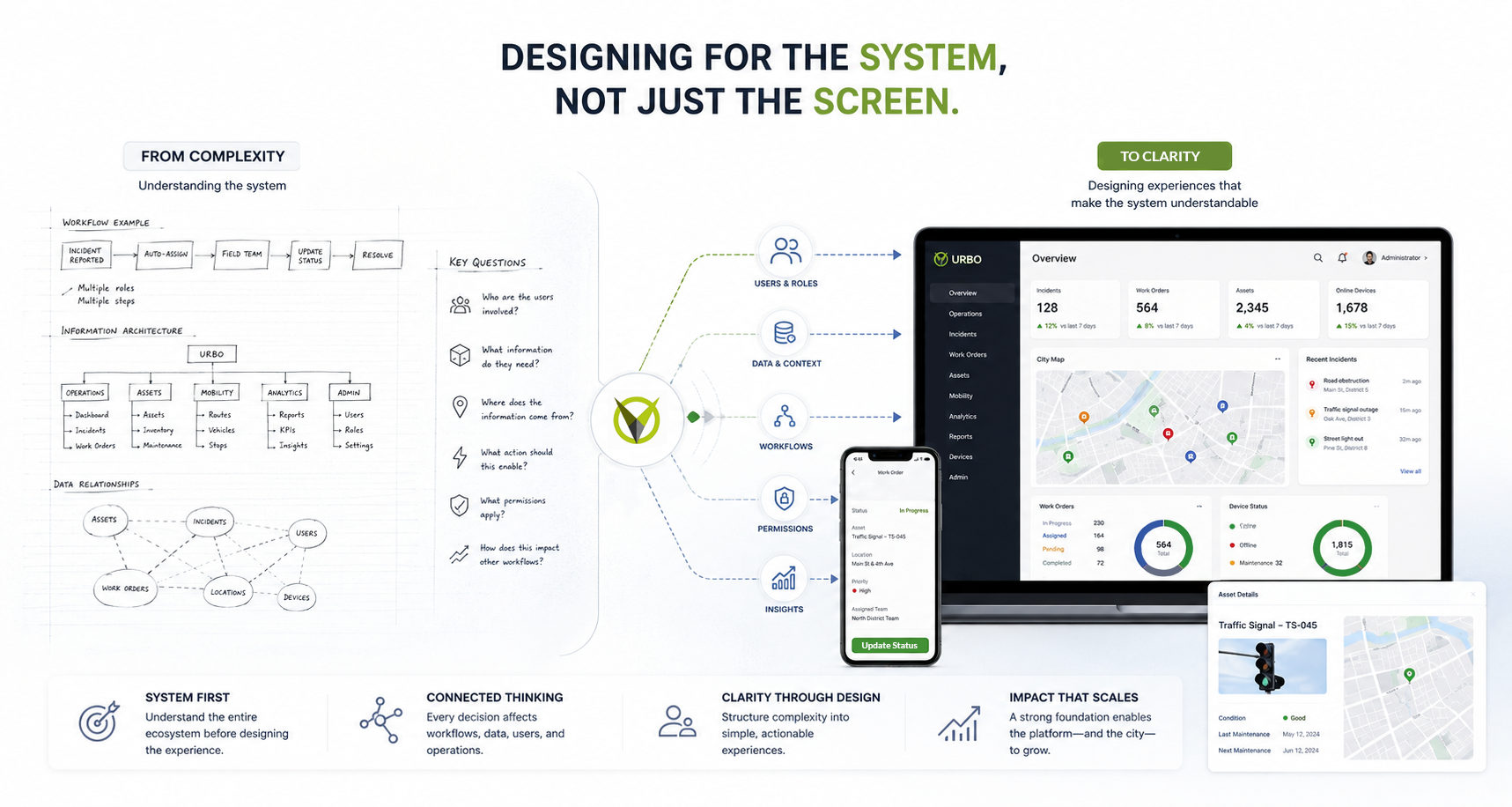
A system-first design approach connects users, data, workflows, permissions, and operational context before translating that complexity into clear product experiences.
From Complexity to Clarity
URBO changed the way I define clarity in product design.
Clarity does not mean removing every layer of complexity from a system. It means understanding which complexity is necessary, who needs to understand it, and how the interface can provide enough structure and context for someone to act with confidence.
It also reinforced that design decisions should remain connected to what we learn. Research, operational signals, and user feedback are most useful when they influence what gets designed—and when the resulting product creates new information that can inform the next decision.
That principle continues to shape how I approach complex products today. URBO became one of the projects that most shaped how I think about product design: not as designing isolated interfaces, but as creating clarity across people, information, workflows, and systems.
Great product design does not remove complexity from the system.
It gives that complexity structure, context, and meaning for the people who use it.
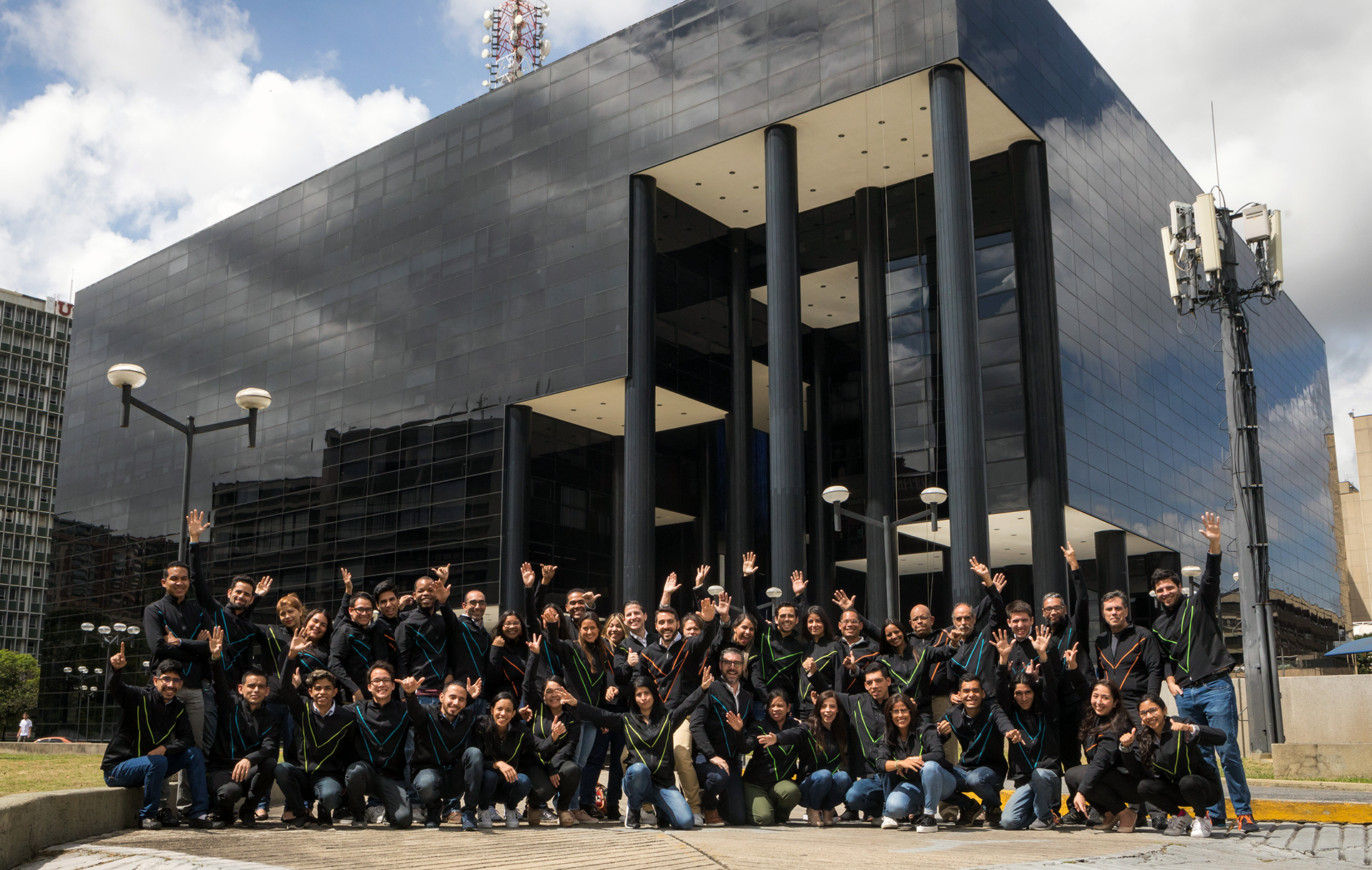
The multidisciplinary VIKUA team behind URBO.
Interested in how I approach complex products?
View my next case study or get in touch about a product design opportunity.